



Table of Contents
A controller closing the month doesn’t have time to decode surprise IT charges while support tickets wait for approval. The same goes for a technology lead weighing security renewals against user requests and aging hardware. Managed IT services pricing belongs in an operations conversation: predictable spend, clear scope, and support levels that match how your teams work.
Jake Barton, Technology Sales Manager at UV&S, notes: “The right pricing discussion starts with business workflow, because a delayed invoice, locked account, or missed approval tells you more than a generic service menu.”
What Managed IT Pricing Should Actually Explain
Vague IT pricing slows ordinary work. A laptop approval stalls, a Microsoft 365 access issue sits unresolved, and finance gets surprised by add-ons that weren’t discussed. Good managed IT pricing explains what’s covered, how support is delivered, and who owns the next step when a ticket affects the workday. Pricing models vary too: in the 2023 Global MSP Benchmark Survey, only 13% of MSPs used per-device pricing, down from 17% the prior year, which makes scope clarity more useful than a simple device count.
-
Service scope: Confirm help desk, endpoint management, patching, Microsoft 365 support, network management, backup, and security responsibilities.
-
Support model: Decide whether fully managed support fits, or whether co-managed support should strengthen your in-house team with escalation, project guidance, and added capacity.
-
Response expectations: Look for in-house, U.S.-based live response during business hours, documented escalation, and after-hours emergency on-call coverage.
-
Budget clarity: Fixed monthly billing, clear add-on pricing, monthly true-ups, and no hidden fees keep approvals cleaner. No guesswork.
A marketing team preparing a campaign launch needs quick permission fixes, secure file sharing, vendor coordination, and Microsoft 365 support without waiting days. Pricing details show up in deadlines, approvals, and the handoff to sales when the campaign goes live.
How Much Does Managed IT Services Cost When Scope Changes
Once pricing basics are clear, the next question is how much does managed IT services cost as your environment changes. UV&S Technology right-sizes recommendations around what’s actually in use, then revisits the plan during Technology Business Reviews so you are not paying for unnecessary complexity.
-
Users and endpoints shift scope: More staff, shared devices, and remote laptops change support volume, patching work, and security coverage. Scale changes scope.
-
Sites and networks add complexity: Multiple locations with firewalls, wireless, and ISP handoffs need more planning than a single office.
-
Security requirements affect coverage: MFA, EDR, email filtering, vulnerability work, and monitoring need clear ownership.
-
Recovery goals shape design: Billing, scheduling, and case files need recovery plans tied to business priority, not a generic backup checkbox.
-
Documentation supports audits: Regulated data and cyber insurance reviews require current policies, diagrams, and proof of controls. If you already have an internal IT team, UV&S Technology can provide co-managed escalation or project support instead of treating full outsourcing as the default.
Reading A Managed IT Services Price List Without Missing Risk
An approval team comparing vendors may see similar monthly fees, then find different limits on onsite help, after-hours coverage, security work, and documentation access. A managed IT services price list helps only when exclusions are just as clear as inclusions.
-
Onsite support terms: Check whether onsite work is included or billed separately when a switch, workstation, or printer blocks a department.
-
Emergency coverage: Confirm after-hours emergency on-call support, not just business-hours help.
-
Documentation ownership: Your documentation should belong to you and be accessible through a client portal.
-
Included service work: Verify backup testing, patching, Microsoft 365 administration, and vendor coordination before tickets pile up.
Those details lead directly into the services your team uses every week.
Help desk support, cybersecurity monitoring, backup recovery planning, Microsoft 365 administration.
Understand Managed IT Better
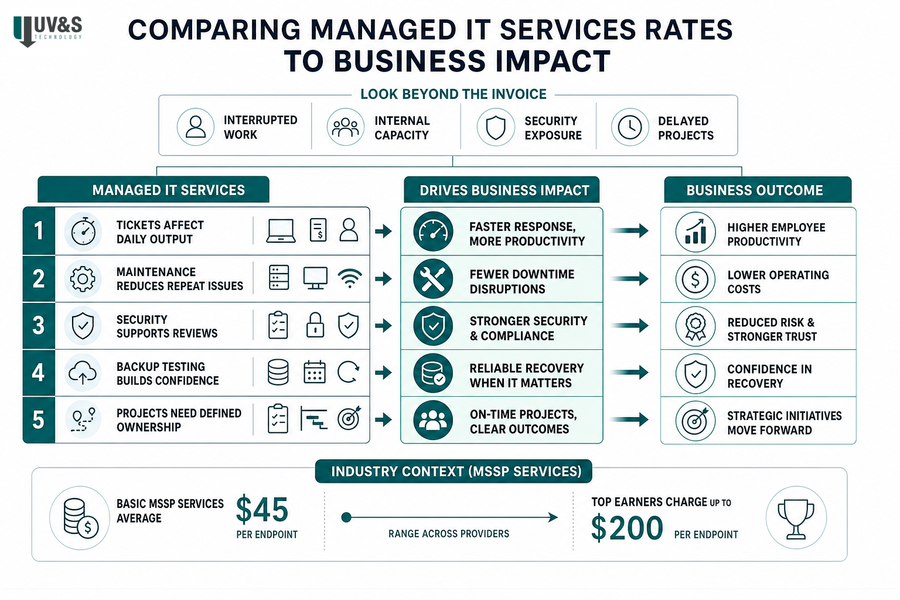
Comparing Managed IT Services Rates To Business Impact
Weigh managed IT services rates against interrupted work, internal capacity, security exposure, and delayed projects, not just the monthly invoice. Industry context supports asking what capability sits behind the number: basic MSSP services averaged $45 per endpoint, while top earners charged $200.
-
Tickets affect daily output: UV&S Technology’s average ticket response is around nine minutes, helping users get back to invoices, approvals, and customer requests faster.
-
Maintenance reduces repeat issues: Preventive patching and monitoring reduce recurring workstation, server, and network disruptions.
-
Security supports reviews: Managed controls help teams gather audit evidence and prepare for cyber insurance conversations with clearer ownership.
-
Backup testing builds confidence: Weekly backup audits and semi-annual restore testing make recovery expectations practical for the systems people rely on.
-
Projects need defined ownership: Professional IT Services give cloud migrations or device upgrades a clear scope, timeline, and outcome while daily support keeps moving. For example, 58% of surveyed respondents with Windows 365 experience said their organization saved $1,000 or more per user or desktop by issuing virtual desktops rather than physical hardware. For local critical issues, UV&S Technology can dispatch support in about 30 minutes.
Clarify Your IT Spend
See what your managed IT pricing should cover and where UV&S can help align support, security, and scope.
Using A Managed IT Services Calculator For Smarter Planning
Budgets, approvals, renewals, and internal capacity rarely line up neatly, so a managed IT services calculator should organize assumptions, not pretend every environment fits one formula. A managed IT services ROI calculator should also include avoided downtime, staff capacity, and project delivery without forcing made-up numbers. For planning context, close to half of cloud buyers spent more than expected in 2023, and 59% anticipated similar overruns in 2024.
-
Build your inventory: Count users, endpoints, servers, network devices, and locations.
-
List critical systems: Include billing, scheduling, case management, production systems, Microsoft 365, and customer-facing tools.
-
Map requirements: Identify security, compliance, and retention needs before renewals or audit requests add pressure.
-
Review ticket patterns: Document recurring support gaps, repeated access issues, vendor handoffs, and slow devices.
-
Separate project needs: Split ongoing support from cloud migration, cybersecurity assessment, backup modernization, application deployment, and IT budgeting. UV&S Technology also offers a complimentary technology assessment and vulnerability scan through Dec. 31, 2026, so planning starts with the actual environment instead of a generic estimate.
Where A Managed IT Services ROI Calculator Fits In The Conversation
ROI is operational. It shows up when staff spend less time chasing access fixes, documentation is ready before an audit request, and technical teams have room to plan upgrades instead of juggling every ticket. Project pricing matters here too, and project-based pricing leads at 82% across all revenue bands.
-
Time returned to staff: Fewer repeat tickets help employees stay focused on invoices, customer handoffs, and approvals.
-
Clearer IT ownership: Documented escalation reduces delays when a SaaS vendor, firewall rule, or user account needs action.
-
Better lifecycle planning: Strategic reviews help schedule renewals, upgrades, and device replacements before deadlines crowd the calendar.
-
Stronger risk visibility: Tested backups, layered security, weekly backup audits, and documented processes support stronger readiness.
ROI planning should guide the service model that fits your team.
Managed IT support, Professional IT Services, cybersecurity, business continuity planning.
Talk Through Your Managed IT Costs With UV&S
A useful pricing conversation should clarify scope, support expectations, security needs, backup readiness, project requirements, and business priorities before anyone signs off on managed IT costs.
If you want a practical review of your environment, talk with UV&S Technology about right-sized fully managed or co-managed support, Professional IT Services, clear fixed pricing, and client-owned documentation. We’ll connect the plan to real workflows like month-end invoices, access approvals, and support tickets, with live U.S.-based support during business hours, after-hours emergency on-call coverage, Technology Business Reviews, and transparent next steps. Trusted. Worldwide.